Preserve the logic. Modernize the platform.
A fresh approach to MultiValue development—clean, reliable and fast to build with.
RightMV runs existing MV applications while giving you a clean browser workspace, flexible execution and storage options, dependable concurrency, straightforward integration and portable system backup.
Windows / Linux / macOS · RightMV 1.4.14.0 · Portable ZIP ~27 MB · Community included
00 / WHAT MULTIVALUE MEANS
A different way to model business data.
MultiValue grew from the Pick system developed in the 1960s. Instead of forcing every repeating fact into another table, one item can contain attributes, repeated values and subvalues. The result became more than a database: accounts, files, a query language, BASIC and an interactive operating environment formed one productive application platform.
Follow the MultiValue story →01 / ARCHITECTURE
One common interface. Interchangeable engines.
ExecutionContext is the boundary between the core, execution engines and storage engines. BASIC can execute directly, through native MVB bytecode, or through three Java strategies. Storage is selected independently.
Explore the architecture →02 / DEVELOPMENT ENVIRONMENT
The system is visible while you work.
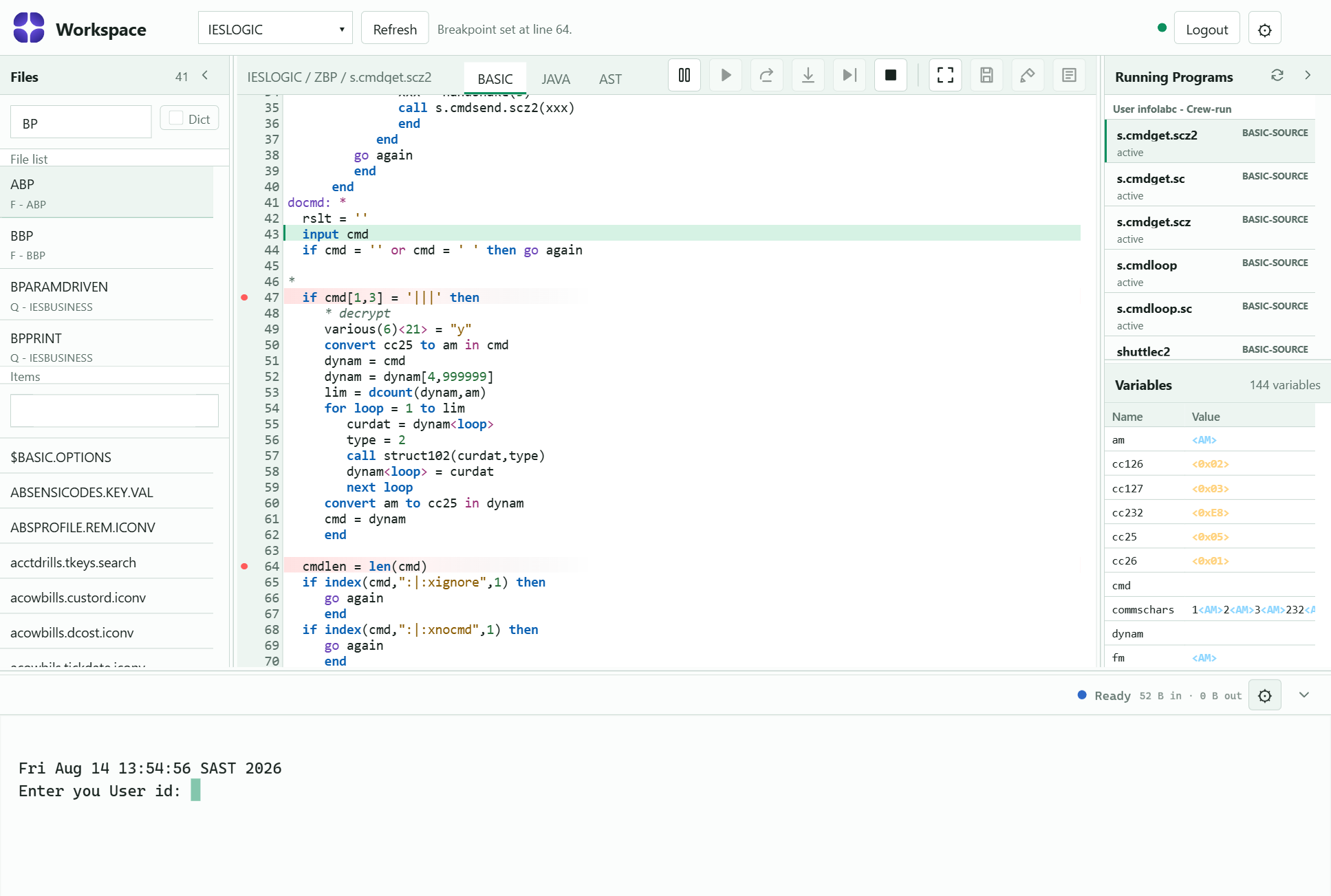
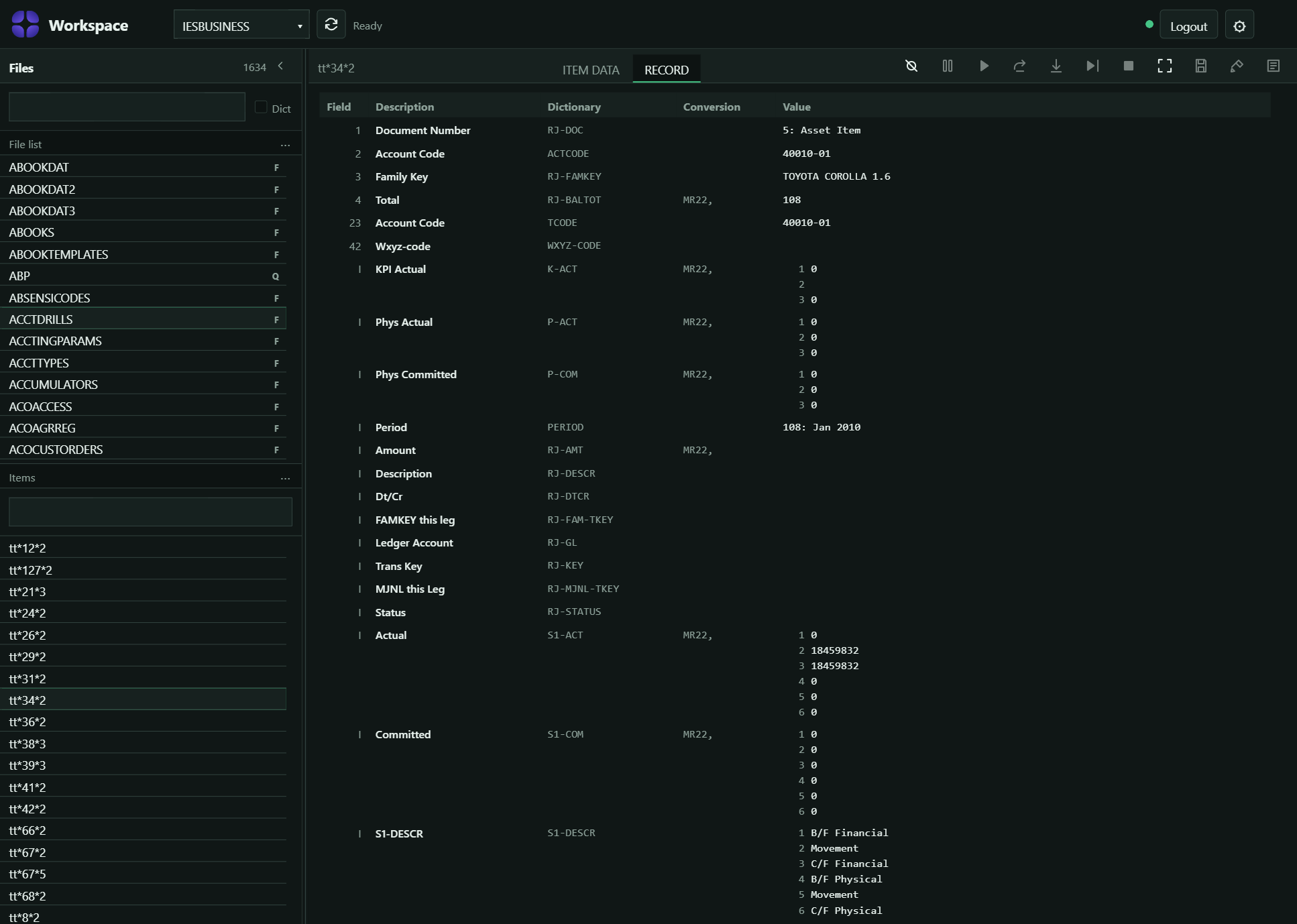
The /dev workspace brings file management, source editing, compilation and debugging into one browser view. Browse account files and records, create, edit or delete items, work with MV BASIC source, and compile or catalog programs without moving between separate tools.
Programs can be debugged while they run. Set and manage breakpoints, pause execution, step through statements, and follow the current source location. Dedicated Breakpoints and Variables panes keep execution state visible, allowing you to inspect and change values while stopped, then continue running to test the program’s behaviour. Configurable panes and split views keep the terminal, source, files and debugging tools visible together.
03 / MEASURED PERFORMANCE
Measured performance across real workloads.
Results include banking data, indexed queries, concurrent sessions and complete-system exports. Detailed pages record the environment and methodology for each test.
Benchmark results and methodology →04 / PORTABLE SYSTEMS
Back up, restore, migrate or clone the complete system.
export-all writes accounts, files, dictionaries and programs to one ZIP. import-all reconstructs the system in another RightMV installation.
05 / LEARN
Learn MultiValue with RightMV.
Progress from accounts, files and dictionaries to MV BASIC, indexes, locking, REST and system administration. Each tutorial has a goal, commands, expected result and next step.
Browse 22+ tutorials →- 01 Install and launch 10 min
- 04 Files, items and dictionaries 15 min
- 08 Write the first MV BASIC program 20 min
- 17 Add and measure an index 25 min
ONE RIGHTMV DOWNLOAD
Community now. Professional later.
RightMV runs immediately in Community mode. Install a Professional licence later to add compiled execution, production storage, encrypted SSH terminals and secure MCP access without reinstalling or migrating the system.
Download RightMV →